
Image SEO is not hard. It is just repetitive, and repetitive work quietly does not get done. You come back from a job with fifteen photos, you optimize two, and the other thirteen sit in a folder forever. Bulk processing exists to fix exactly that. Here is the workflow, where it genuinely saves time, and where doing it in bulk will actively hurt you.
Why bulk, honestly
Let us put a number on it. Optimizing one image properly means renaming it, setting the GPS, filling in city and region, writing alt text, writing a title, adding a few tags, embedding the metadata and compressing the file. Done carefully, by hand, that is four to five minutes. Five images is twenty-five minutes.
Twenty-five minutes is exactly the amount of time that makes a task get postponed. So the photos never get optimized, and the argument about whether geotags influence rankings becomes academic, because the work is not happening at all.
The main benefit of bulk is not that it is technically superior. It is that it makes the job small enough to actually do.
Same five images, one bulk pass, shared location: roughly two minutes. That is the whole pitch. The output is not better than careful manual work — it is the same work, done in a way you will repeat next week.
What can be shared and what cannot
This is the part that determines whether bulk helps or hurts. Some fields are legitimately shared across a set of photos. Others must be unique per image, and copying them is worse than leaving them blank.
| Field | Share across the set? | Why |
|---|---|---|
| GPS coordinates | Yes, if same place | Five photos of one driveway were taken at one address. One coordinate is correct for all of them. |
| City / region / country | Yes | Follows the coordinates. |
| Creator / copyright / credit | Yes | Same business, same photographer, same rights. |
| Target keyword | Yes | One job, one topic. It anchors the whole set. |
| Alt text | No | Each frame shows something different. Identical alt text is a wasted signal and bad for screen reader users. |
| Filename | No | Must be unique, and should describe that specific shot. |
| Title / caption | No | Same reason as alt text. |
A good bulk tool understands this distinction. A bad one applies everything to everything and leaves you with five files carrying the same alt text, which is measurably worse than one properly optimized image and four untouched ones.
The bulk workflow, step by step
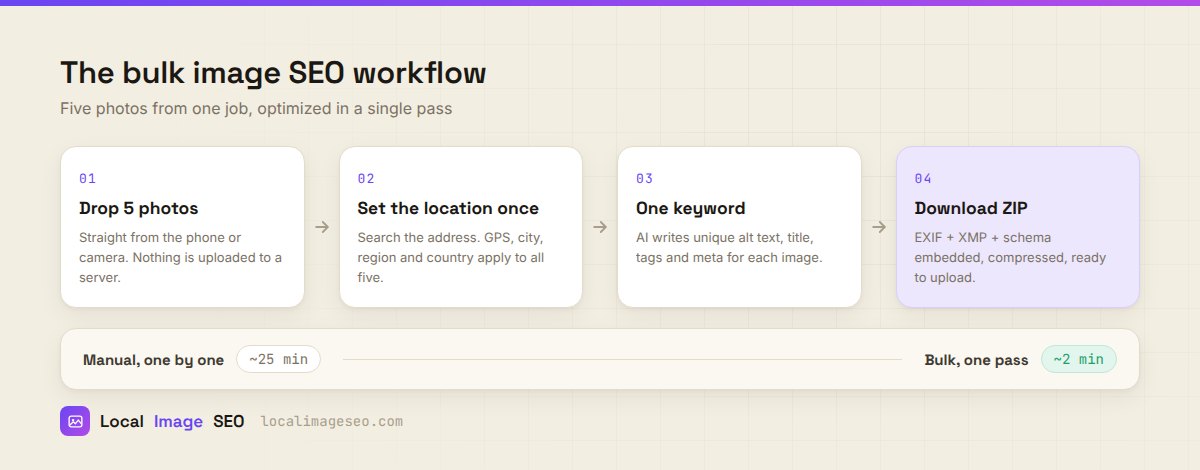
- Select the set. Group photos that share a location and a subject. Five shots of the same roof repair is a set. Five shots from five different towns is not — run those separately.
- Drop them in. Straight off the phone is fine. In our tool nothing is uploaded to a server; the processing happens in your browser, on your machine.
- Set the location once. Search the job address, drag the pin onto the actual building if the address point lands on the road, and let it resolve latitude, longitude, altitude, city, region and country. That applies to all five.
- Give it one keyword. Something like
roof repair oldham. This anchors the set without forcing every image to say the same thing. - Generate, then read it. Each image gets its own filename, alt text, title, caption, meta description and tags. Read them. This is the step people skip and it is the only step where quality is decided.
- Download the ZIP. Five JPEGs with EXIF, XMP and IPTC embedded, compressed and ready to upload.
Step five deserves emphasis. Generated metadata is a first draft, not a finished product. Anything auto-written describes what a model infers from the pixels, and it will occasionally be confidently wrong — calling a soffit a gutter, or missing that the van in shot is yours. Thirty seconds of reading turns a decent draft into something accurate.
Try the bulk pass
Five images, one location, one keyword. Free, no signup, and your photos never leave your browser.
Open the toolKeeping each image distinct
The failure mode of bulk work is sameness. Five files that all say "roof repair in Oldham" are five copies of one signal, not five signals.
The fix is to shoot with variety in mind, because distinct photos produce distinct descriptions automatically. A useful set from a single job looks like this:
roof-repair-oldham-before.jpg— wide, shows the problem.roof-repair-oldham-shingles.jpg— close, shows the material and the craft.roof-repair-oldham-in-progress.jpg— a person working, proves it is real.roof-repair-oldham-complete.jpg— the finished result.roof-repair-oldham-detail.jpg— the bit you are proud of.
Same keyword, same coordinates, five genuinely different images with five genuinely different descriptions. That is what a good set looks like, and it takes no more time on site than taking five near-identical shots of the same corner.
How agencies run this at scale
If you are handling image SEO for clients rather than for yourself, the constraint changes. You are not trying to save four minutes; you are trying to make the output consistent across people who will not all care equally.
A few things that hold up in practice:
- Fix the naming convention first.
service-material-town.jpg, decided once, written down. Without this, three people produce three schemes and the whole set looks accidental. - One set per job, not per client. The location is the natural boundary. Batching a whole client's quarter into one pass is how wrong coordinates end up on the wrong photos.
- Keep the credit and copyright fields filled. They are shared, they take one setup, and they matter the day an image gets reused somewhere you did not authorise.
- Review is not optional. Build the thirty second read into the process explicitly, or it will not happen.
- Archive originals. Clients change their minds about crops, watermarks and branding.
The honest ceiling: browser-based bulk work suits sets of a handful at a time, which matches how photos actually arrive — job by job. If you are processing thousands of product images, you want a server-side pipeline, not a browser tool. Different problem, different tool.
When bulk is the wrong tool
Bulk is a shared-context feature. Remove the shared context and it stops being an advantage:
- Photos from different locations. Obvious, but it is the most common misuse. Split them.
- Your hero and cover images. The two or three photos that carry the page deserve individual attention. Write those by hand.
- Photos where the subject varies wildly. A team portrait and a drainage close-up do not share a keyword in any useful sense.
- Anything going into a legal, medical or compliance context, where a wrong auto-written caption is a real problem rather than an inconvenience.
Mistakes to avoid
- Stamping one location onto photos taken elsewhere. If the shots are not from that town, do not claim they are. It is untrue and trivially checkable.
- Shipping generated text unread. The draft is good. It is not always right.
- Exporting to WebP or PNG when you need embedded metadata. Use JPEG when EXIF and XMP have to travel with the file.
- Compressing twice. Compress once, at the end. Repeated passes visibly degrade the image.
- Treating the ZIP as the finish line. The files still have to get published somewhere, next to relevant copy. Optimized images sitting in a downloads folder do nothing at all.
Get the set right, share only what is genuinely shared, read the output, publish it next to the matching content. That is the entire discipline.
FAQ
Can you geotag multiple images at once?
Yes, when they share a location. Set the coordinates once and apply them across the set. Our tool does up to five at a time in the browser.
Should bulk images share the same alt text?
No. Share the location and the keyword; write distinct alt text for each frame. Identical alt text is a wasted signal and a bad experience for anyone using a screen reader.
Is bulk geotagging safe for SEO?
Safe when the photos genuinely come from that place. It becomes misrepresentation when you use it to claim a location you were never at.
How long does it actually take?
Roughly two minutes for five images with a shared location, versus twenty-five doing it individually.
Why only five at a time?
Because the processing runs in your browser, on your device, rather than on a server. That is also why your photos never get uploaded anywhere. Five is the point where the trade stays comfortable on an average laptop.
Optimize your next five photos
Geotag, describe, embed and compress in one pass. Free, no signup, entirely in your browser.
Open the tool