
Your Google Business Profile is often the first thing a customer sees — before your website, before your reviews get read properly. The photos on it do a lot of quiet work. This guide covers what to upload, at what size, how to name and geotag it, and how often to post, with an honest line drawn between what actually helps and what is folklore.
Why Google Business Profile photos matter
When someone searches for a plumber, a dentist or a driveway company in their town, they get a map pack and a list of profiles. Most of them look similar: a name, a star rating, a phone number. The thing that separates one from the next, in the two seconds a person spends deciding, is usually the photo.
Photos do three jobs on a profile. They prove the business is real and currently trading. They show the standard of the work. And they answer questions the copy never gets round to: is this place accessible, is it busy, do they do the exact thing I need? A profile with twelve current, clear, relevant photos gets treated differently by a human being than one with a blurry logo uploaded in 2019.
That is the honest case for photos. It is a conversion case first, and a search case second.
The honest truth about photos and rankings
There is a persistent belief in local SEO circles that uploading geotagged photos to a Business Profile pushes you up the map pack. It sounds plausible. The evidence for it is thin.
Google strips most metadata from images on upload. Assume the GPS coordinates you embed will not survive the trip into a Business Profile, and plan accordingly.
Google has never confirmed that it reads EXIF GPS from profile photo uploads, and multiple independent tests over the years have failed to show a reliable effect. What Google has said publicly is that local rankings rest on relevance, distance and prominence — and prominence is driven by reviews, citations, links and your website, not by photo metadata.
So why does this guide still tell you to geotag? Because the same photo file usually lives in two places: your Business Profile, where the metadata is likely stripped, and your website, where you control the surrounding context and nothing gets stripped. Doing the work once serves both. And it costs seconds, not hours.
The realistic framing: photos on your profile improve how many people click and call. That is worth real money on its own. Anything they contribute to ranking is a bonus you should not build a strategy around. If you want the mechanics of what search engines genuinely read from an image, we broke it down in EXIF, IPTC and XMP: which image metadata actually matters.
Photo types and sizes that work
Google's official minimum is 250 by 250 pixels, with a 5 MB ceiling. That is a floor, not a target. Upload at the sizes below and your photos will render cleanly on a phone, which is where nearly all of this gets viewed.
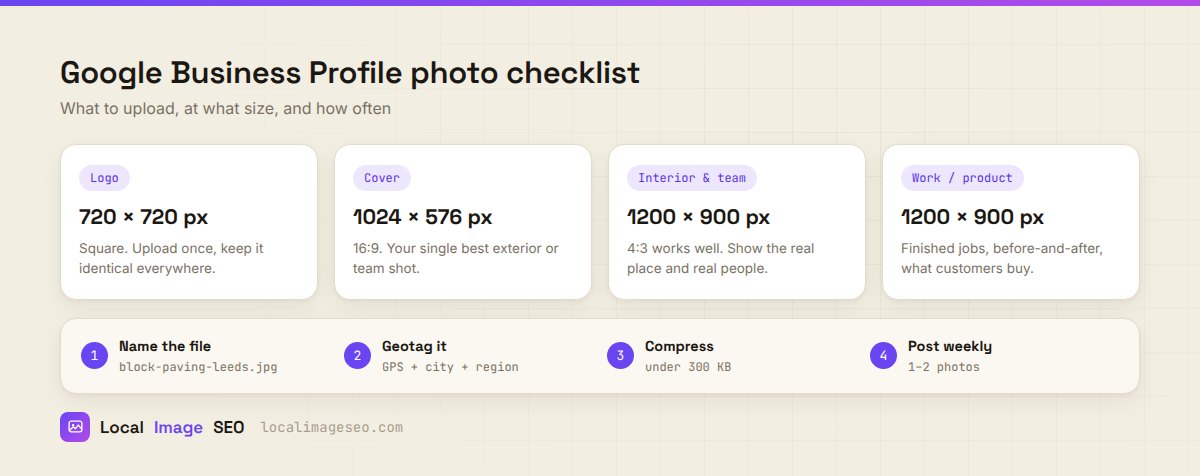
| Photo type | Size | What it is for |
|---|---|---|
| Logo | 720 × 720 px, square | Brand recognition. Upload once. Keep it byte-identical to the logo on your site and socials. |
| Cover | 1024 × 576 px, 16:9 | The headline image. Your single strongest exterior, premises or team shot. |
| Interior & team | 1200 × 900 px, 4:3 | Proof the place and the people are real. Shot on a phone is fine. |
| Work & product | 1200 × 900 px, 4:3 | Finished jobs, before and after, the thing customers actually buy. |
Two practical notes. Shoot in landscape for anything that might become a cover, because Google crops aggressively and portrait photos lose their subject. And avoid heavy filters — a profile that looks over-processed reads as stock imagery, which does the opposite of building trust.
Prepare the file before you upload
The upload itself takes five seconds. The value is in what you do to the file first. Four steps, in order:
- Rename it.
IMG_4471.jpgtells nobody anything.block-paving-driveway-leeds.jpgdescribes the content and the place. This matters mostly for the website copy of the photo, but building the habit here means you never have to think about it twice. - Geotag it. Set the real coordinates of the location shown — the job address, the shop, the site. Not your office, unless the office is what is in the frame.
- Compress it. Aim for under about 300 KB. A 6 MB phone photo will be recompressed by Google anyway, and the website copy will drag your page speed down.
- Keep the original. Archive the untouched file somewhere. You will want it when you need a different crop later.
All four steps happen in one pass with our free browser tool, but the steps matter more than the tool. Do them by hand if you prefer.
Do all four in one pass
Rename, geotag, write the metadata and compress — free, in your browser, no signup. Up to 5 photos at once.
Optimize a photo freeShould you geotag GBP photos?
Yes, but for the right reason and with the right expectations.
The wrong reason is believing the geotag itself moves you up the map pack. It very probably does not, and the metadata likely does not survive the upload. Anyone selling you a geotagging service on a ranking promise is overselling.
The right reason is that geotagging is part of preparing the file properly, and the file gets reused. The copy that lands on your website keeps its EXIF GPS, its IPTC city and region, and sits next to a heading and a caption that reinforce the same location. That combination is legitimate context. It is also what you would want anyway if a journalist, a directory or an AI assistant ever pulled the image and needed to know where it came from.
The full method is in our step-by-step guide to geotagging images for local SEO, including the detail that trips people up: EXIF stores GPS in degrees, minutes and seconds, so 53.4808 shows up as 53° 28' 51" in file properties. Same point, different notation, not a bug.
A posting cadence you can keep
Most advice here is unrealistic. You are not going to post daily. Nobody runs a trade business and posts daily.
One or two genuinely new photos per week is achievable and it is enough. What you are signalling is simple: this business is open, working, and someone is paying attention. A profile that gets two real photos a week for a year looks profoundly different from one that got forty uploaded in a single afternoon and nothing since.
The practical trick is to attach it to something you already do. Finish a job, take three photos before you pack up. That is the whole system. If you run a shop, photograph the window change, the new stock, the seasonal display.
What to avoid: dumping your entire archive at once, uploading the same shot from four angles, and posting stock photography. Customers spot stock instantly, and it undermines everything else on the profile.
Use the same photos on your website
This is the step most businesses skip, and it is where the actual SEO value is.
Every photo you upload to your profile should also go on the matching page of your site — the service page, the town page, the case study. On your own site you control everything Google actually reads:
- Alt text, describing what is in the photo. This is the strongest textual signal an image has, and your Business Profile does not even offer the field.
- Surrounding copy — the heading above it, the caption below it, the paragraph beside it.
- The filename, which stays exactly as you set it.
- Schema markup, if you want to declare the image, its caption and its coordinates in a machine-readable way.
None of that survives on a Business Profile. All of it survives on your site. So the profile gets the conversion benefit and the website gets the search benefit, from the same afternoon's work. If you are writing alt text at any volume, our complete guide to alt text for local businesses has the formula and the examples.
Mistakes that quietly cost you
- Stock photos. The single fastest way to look like every other listing. Use your own work, even if it is imperfect.
- Uploading 6 MB straight off the phone. Slow, and the website copy will hurt your Core Web Vitals.
- Geotagging the office instead of the job. If the photo shows a driveway in Oldham, the coordinates should be that driveway.
- Fake coordinates to "target" a town you do not serve. This is the one genuinely risky move on the list. It is misrepresentation, it is trivially checkable, and there is no upside.
- Photos with no people or no context. A close-up of a tap tells a customer nothing. A tap being fitted in a real kitchen does.
- Treating the profile as finished. It is a feed, not a brochure.
FAQ
Does geotagging photos help Google Business Profile rankings?
There is no confirmed evidence that it does, and Google strips most metadata on upload. Do it because the same file gets reused on your website, where context genuinely counts, and because it takes seconds. Do not build a strategy on it.
What size should Google Business Profile photos be?
720 by 720 for the logo, 1024 by 576 for the cover, around 1200 by 900 for interior, team and work photos. Keep files under roughly 300 KB.
How often should I post photos?
One or two new photos a week, indefinitely. Consistency beats volume every time.
Can I add alt text to Business Profile photos?
No, the field does not exist there. Write alt text for the copies you publish on your own website.
Should I delete old photos?
Only if they misrepresent the business now — an old shopfront, a discontinued service, a member of staff who left. Otherwise leave them; volume of genuine history is not a problem.
Try it on your next job photos
Geotag, name, describe and compress up to five images at once. Free, no signup, runs entirely in your browser.
Open the tool