
Alt text is the most valuable image field you control, and the one most often filled in badly. It is also the only one that does two entirely separate jobs at once: it makes your site usable for people who cannot see the image, and it tells search engines and AI assistants what the image shows. This guide covers the formula, real examples, and the specific ways it goes wrong.
What alt text actually is
Alt text is an attribute on the image tag in your page's HTML:
<img src="block-paving-driveway-leeds.jpg" alt="Charcoal grey block paving driveway completed outside a semi-detached house in Leeds">
It is not stored in the image file. That trips people up constantly, so it is worth being blunt about: alt text lives on your page, not in your photo. If you email the JPEG to someone, the alt text does not travel with it. If you upload the photo to Google Business Profile or Facebook, your alt text does not go with it either — those platforms have their own fields, or none at all.
What does live inside the file is EXIF, IPTC and XMP data: GPS, captions, creator, copyright. Those are different fields with different lifespans, and we compared all of them in which image metadata actually matters for SEO.
The practical consequence: alt text is written once per placement, on the page where the image appears. Which is exactly why it is worth getting right, because it is the field nobody can strip from you.
Why it matters more than the rest
Two reasons, and the first one is not about SEO at all.
Accessibility. Someone using a screen reader hears your alt text in place of the image. Empty alt on a meaningful photo means they get silence, or worse, the filename read aloud character by character. That is a real person having a worse experience on your site. In many jurisdictions it is also an accessibility obligation, not a nicety.
Machine understanding. Search engines have got good at recognising objects in images, but they still lean heavily on text to understand relevance. A model can tell there is a roof in your photo. It cannot tell that the roof is in Oldham, that you fixed it, or that this is the service the page is selling. Alt text tells it all three.
Every other image signal is optional. Alt text is the one that survives every platform, every crawl and every assistive technology, because it is part of your page rather than your file.
The formula
Describe what is in the frame, specifically, in a sentence a person would actually say. If your target keyword belongs in that sentence honestly, it will appear on its own.
A structure that works for local businesses:
[what is happening] + [the specific thing] + [where], if the location is genuinely visible or relevant.
- "Roofing contractor replacing storm-damaged shingles on a Dallas home"
- "Finished block paving driveway in charcoal grey outside a Leeds semi-detached house"
- "Recovery driver loading a broken-down hatchback onto a flatbed truck on the M60"
Each one has the keyword in it. None of them were written by starting with the keyword. That is the whole trick: describe the photo accurately and the keyword arrives naturally, because the photo is the thing the keyword describes. If it does not arrive naturally, that is useful information — it means the photo does not actually illustrate the keyword, and forcing it in will not fix that.
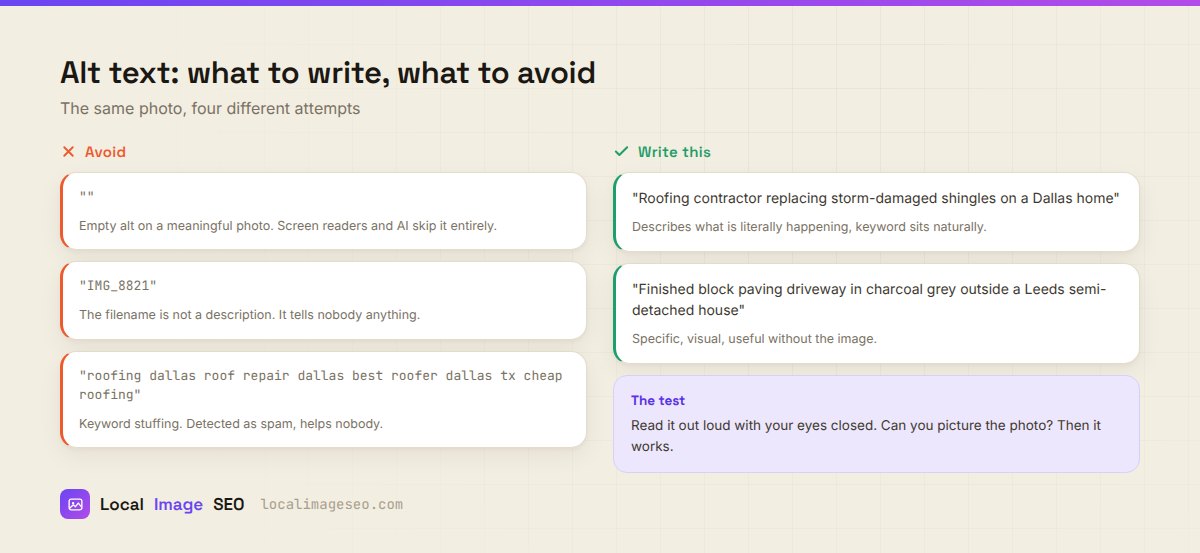
Good and bad, side by side
| Attempt | Verdict |
|---|---|
alt="" on a meaningful photo | Screen readers skip it entirely. Search engines learn nothing. A wasted slot. |
alt="IMG_8821" | The filename is not a description. Read aloud, it is noise. |
alt="roofing dallas roof repair dallas best roofer dallas tx cheap roofing" | Keyword stuffing. Detected as spam, and genuinely unpleasant to listen to. |
alt="Roofing contractor replacing storm-damaged shingles on a Dallas home" | Describes the frame, keyword sits naturally, useful without the image. |
The test: read your alt text out loud with your eyes closed. Can you picture the photo? If yes, it works. If you just hear a list of search terms, rewrite it.
Examples by trade
Generic advice produces generic alt text, so here is what good looks like across a few local verticals.
Roofing
- Weak: "roof repair"
- Better: "Roofer fitting new grey slate tiles on a terraced house roof in Oldham"
Driveways and paving
- Weak: "driveway paving leeds driveway company"
- Better: "Newly laid herringbone block paving driveway with charcoal border outside a Leeds home"
Vehicle recovery
- Weak: "recovery truck"
- Better: "Recovery technician winching a silver saloon onto a flatbed on the hard shoulder at night"
Dental and clinical
- Weak: "dentist Manchester best dental clinic"
- Better: "Dental hygienist explaining a treatment plan to a patient in a Manchester clinic room"
Restaurants and cafes
- Weak: "best restaurant food"
- Better: "Wood-fired margherita pizza served on a wooden board at a Sheffield pizzeria"
Notice a pattern: every improved version contains a detail a competitor could not copy without having been there. That is the mark of alt text describing a real photo instead of a category.
Get a first draft in one click
Our tool reads the image and writes the alt text, title, caption and tags for you — then you edit it. Free, in your browser.
Try it on a photoHow long should it be?
Around 8 to 16 words. Roughly 125 characters is the practical ceiling, mostly because some screen readers cut off around there and because anything longer stops being a description and starts being an essay.
Shorter is fine when the image is simple. "Company van parked outside a customer's house in Bolton" is nine words and complete. Do not pad it to hit a length.
If an image genuinely needs more explanation — a chart, a before-and-after comparison, a complicated diagram — the explanation belongs in a caption or in the paragraph next to it, where everybody benefits from it. Alt text is not the place to hide content.
Decorative images and the empty alt
Not every image needs describing. Background textures, dividers, decorative flourishes, spacer graphics: these carry no information, and describing them just adds noise for someone listening to the page.
For those, use an explicitly empty alt: alt="".
That is not the same as leaving the attribute off. <img src="divider.png"> with no alt attribute at all can cause some screen readers to fall back to announcing the filename. An empty alt is an instruction: this image is decorative, skip it. Missing alt is an omission: the reader has to guess.
The distinction to apply: if the image disappeared and the page lost nothing, alt is empty. If the image disappeared and a reader would miss something, describe it.
Alt text, AI search and GEO
This part has changed genuinely in the last two years, and it is worth being precise about it rather than hand-waving.
When an AI assistant browses the web to answer a question, it reads pages largely as text. It is not running vision over every image on every page it touches — that is expensive and slow. It reads the HTML. Which means the way your image gets understood, and the way it gets cited, is through your alt text and the copy immediately around it.
The practical effect: alt text has become more valuable, not less, as AI assistants have become a route people use to find local businesses. An assistant asked to recommend a paving company in Leeds is reading descriptions, not admiring photographs.
Nothing about this changes the advice. Write accurate, specific descriptions of real photos. The thing that works for a screen reader user in 2015 is the thing that works for an AI assistant in 2026, which is a reassuring sign that it is the right approach rather than a trick.
Auditing what you already have
Most local sites have a mix: some alt text written properly, some auto-filled by a theme, some missing entirely. A pass over an existing site, in order of return:
- Find images with no alt attribute at all. Browser dev tools, or any free crawler, will list them. These are your worst offenders.
- Find alt text that equals the filename. Usually a sign the CMS auto-filled it.
alt="IMG-20240612-WA0003"and similar. - Find duplicated alt text. If fifteen images share one description, fourteen of them are doing nothing.
- Fix the images that carry the page first. Hero, service photos, before-and-after. Not the footer icons.
- Leave decorative images empty, deliberately. Do not "fix" a divider by describing it.
You do not need to do the whole site in one sitting. The hero and the main service images on your top five pages will cover most of the value.
And once you are naming and describing images properly, it is worth doing the rest of the file at the same time — the filename, the GPS, the compression. That is covered in the geotagging guide, and if you are handling more than one photo at a time, the bulk workflow makes it a two minute job rather than a twenty five minute one.
FAQ
How long should alt text be?
About 8 to 16 words, or roughly 125 characters. Long enough to describe the frame, short enough to listen to.
Should alt text include my keyword and city?
Only when they describe the image truthfully. If the photo shows the work in that town, both appear naturally. If it does not, forcing them in is stuffing.
Do decorative images need alt text?
No. Give them an explicitly empty alt="" so screen readers skip them. Do not omit the attribute entirely.
Does alt text matter for AI search?
Yes, and arguably more than it used to. AI assistants read pages as text, so alt text and the copy around an image are the main way they understand what it shows.
Can AI write my alt text?
It can write a good first draft from the image, which is most of the work. It cannot know the customer's name, the town you were in, or that the van in shot is yours. Read it and correct it — that takes seconds and it is the difference between accurate and plausible.
Is alt text a ranking factor on its own?
It is a relevance signal, not a lever you can pull to rank. It helps search engines and assistants understand what your images and pages are about. It will not outrank a competitor with better content, reviews and links.
Write better alt text in seconds
Upload a photo, get a draft description, edit it, and embed the rest of the metadata while you are there. Free, no signup.
Open the tool