
Image metadata is surrounded by more confident nonsense than almost any other corner of SEO. Some of it is genuinely useful, some of it gets deleted the moment you upload a file, and some of it does nothing at all while being sold as a ranking service. Here is what each layer actually is, what survives, and what is worth your time.
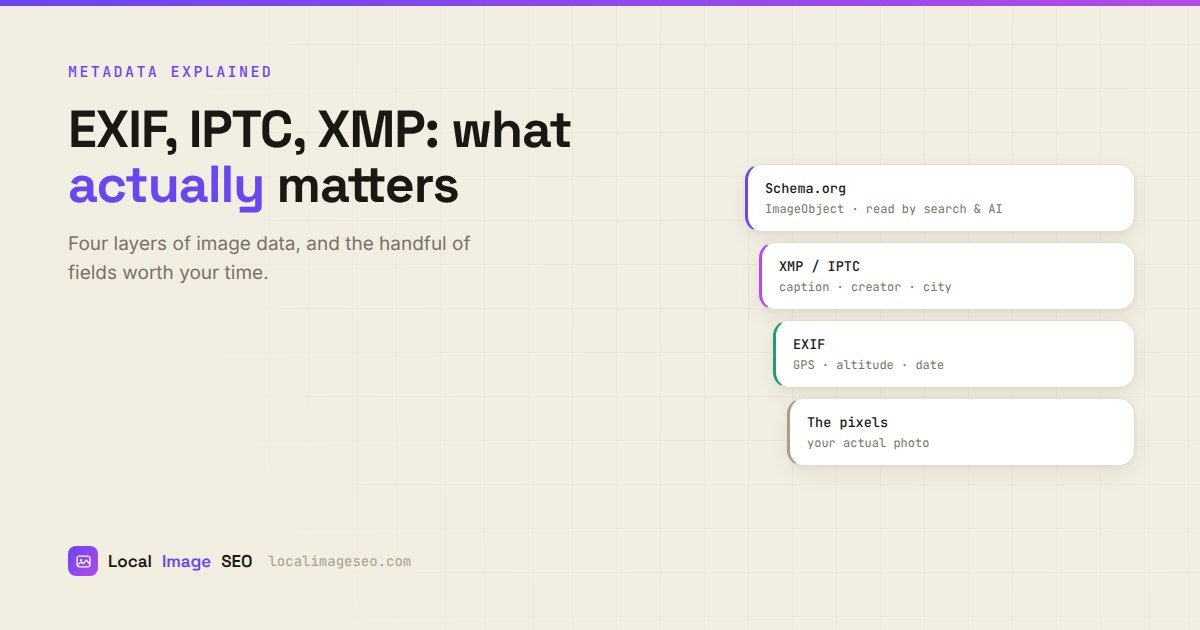
Four layers, one file
A single JPEG on your website is carrying up to four separate descriptions of itself, written by different people, at different times, for different reasons. They do not overwrite each other. They sit in the same file, mostly ignoring one another.
- EXIF — written automatically by the camera or phone. Technical. GPS, altitude, timestamp, shutter speed, device.
- IPTC — written by a human or a tool. Editorial. Caption, creator, credit, copyright, city, region, country, keywords.
- XMP — Adobe's container format. Structured, extensible, and in modern practice the place IPTC fields actually live.
- Schema.org — not in the file at all. It sits on your web page as JSON-LD and describes the image to machines.
Understanding which is which explains most of the confusion, because advice about one layer gets applied to another constantly. "Metadata does not matter" and "metadata is a ranking factor" are both wrong, and they are wrong about different layers.
EXIF: what the camera wrote
EXIF is generated at the moment of capture, without anyone deciding anything. Your phone writes it silently.
The fields that matter to a local business:
- GPS latitude and longitude — where the photo was taken.
- GPS altitude — height above sea level, which corroborates the coordinates.
- DateTimeOriginal — when it was taken. Useful evidence that work is recent.
- Make and Model — the device. Harmless, occasionally useful for proving a photo is yours.
One notational quirk that generates a steady stream of support questions: EXIF stores coordinates in degrees, minutes and seconds, not decimals. So 53.4808 appears in file properties as 53° 28' 51". That is the same point. Nothing is broken.
EXIF is also the layer with a privacy dimension. A photo of your kitchen posted publicly with EXIF GPS intact tells a stranger your home address. That is precisely why so many platforms strip it, and it is why "always keep your EXIF" is not universally good advice. For business premises and job sites the calculation is different, because the location is public information you actively want associated with the work.
IPTC: what the editor wrote
IPTC came out of the newspaper industry, which is the key to understanding it. It exists so a photo can travel from a photographer to an agency to a newsroom and still carry the answers to: who took this, who owns it, what is happening in it, where was it taken, who do we credit.
The fields worth using:
- Caption / Description — a sentence describing the photo. Not the same as alt text, though it may say something similar.
- Creator / By-line — the photographer or business.
- Copyright Notice — your rights statement.
- Credit Line — how you want to be credited if reused.
- City, Province/State, Country — the location in words rather than coordinates.
- Keywords — topical terms.
IPTC is the one layer where Google has publicly confirmed it does something: it reads IPTC creator and copyright fields to support image licensing features in Google Images. That is not a ranking benefit, but it is a documented use, which is more than can be said for most metadata claims.
XMP: the modern container
XMP is the format the other standards moved into. Adobe designed it as an extensible container, and it can hold IPTC fields, Dublin Core fields, custom schemas and more, all in structured XML embedded in the file.
In practice, when a modern tool says it is writing IPTC data, it is usually writing IPTC fields inside XMP. The distinction matters to software engineers and almost never to you. What matters is that the fields are written somewhere a reader can find them, and that legacy IPTC blocks and XMP stay in sync so old and new software agree.
The practical rule: use JPEG when you need embedded metadata. PNG support is patchy. WebP metadata support exists but is inconsistently implemented across tools. If the metadata has to travel with the file, JPEG is the format that will not surprise you.
Schema: the layer that is not in the file
Schema.org markup is the odd one out. It is not metadata inside your image — it is JSON-LD sitting on the page, describing the image to machines in a vocabulary they already understand:
{"@type":"ImageObject","contentUrl":"...","caption":"...","creator":{...},"contentLocation":{...}}
Because it lives on your page, nobody strips it. It says explicitly what the other layers only imply. And unlike EXIF, it is designed from the ground up to be read by search engines rather than by photo management software.
It is not a magic ranking lever either. But of the four layers, it is the one specifically built for the job people imagine EXIF is doing.
What survives upload
This is the part that determines everything else, and it is where most metadata advice quietly falls apart.
Broadly:
- Your own website: everything survives, because you control the hosting. Some CMS platforms strip metadata when generating thumbnails, so check your setup rather than assuming.
- Google Business Profile: most metadata is stripped on upload. Assume your GPS does not make it.
- Facebook, Instagram, X: stripped, aggressively, and for good privacy reasons.
- WhatsApp: removes everything. This is why job photos sent from a phone to an office arrive with no GPS at all.
- Email: usually survives, if the client does not "optimize" attachments.
So the honest summary: embedded metadata reliably survives in exactly one place that matters — your own site. Everywhere else, treat it as a bonus. Anyone selling geotagging as a Business Profile ranking service is selling you a file property that gets deleted at the door.
Write all four layers in one pass
EXIF GPS, XMP and IPTC fields, plus copy-paste Schema markup for your page. Free, in your browser, nothing uploaded.
Try the tool freeWhat search engines actually read
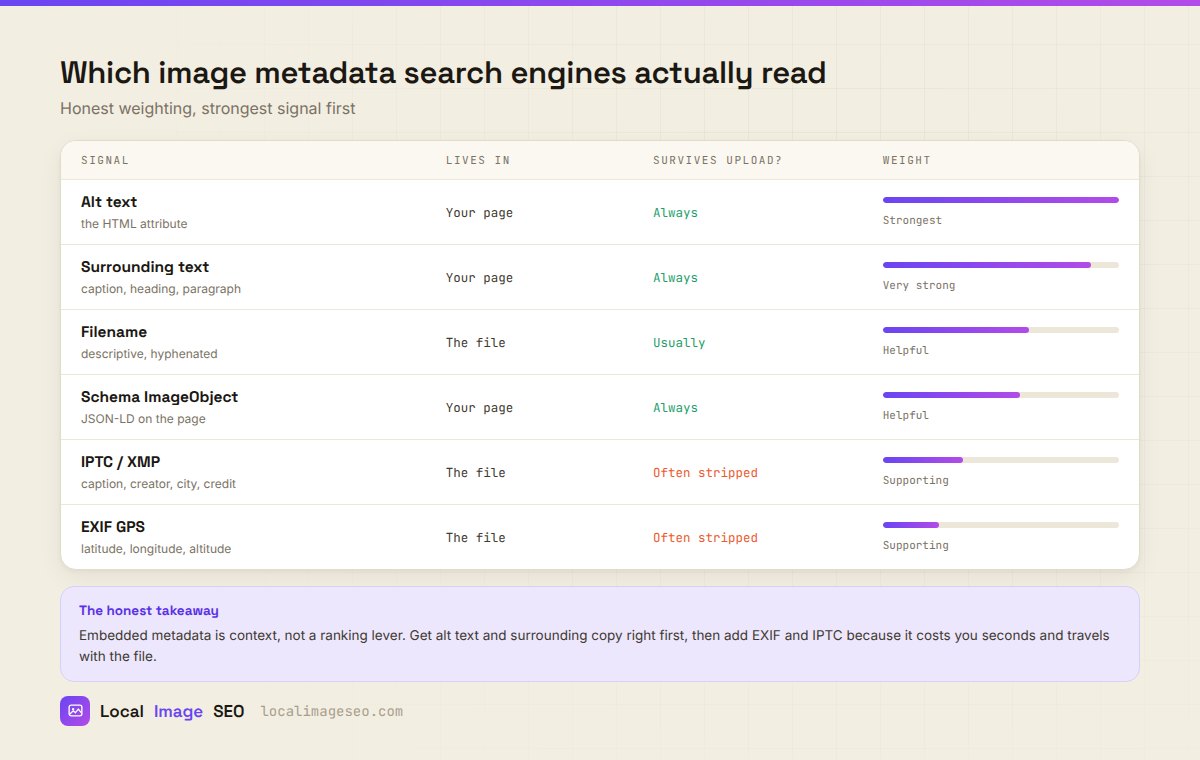
Here is the ordering that the evidence supports, strongest first:
- Alt text. The HTML attribute. Read by every crawler and every AI assistant that processes web pages. Nothing else is close.
- Surrounding text. The heading above, the caption below, the paragraph beside. Context is how relevance gets established.
- Filename. A modest, real signal.
block-paving-leeds.jpgbeatsIMG_8821.jpg. It will not carry a page on its own. - Schema ImageObject. Explicit, machine-readable, and it never gets stripped.
- IPTC / XMP. Confirmed to be read for licensing. Supporting context otherwise.
- EXIF GPS. No confirmed ranking use. Supporting information at best.
The pattern is hard to miss: the things that live on your page beat the things that live in your file. Every time. That is not a fashion, it is structural — page content cannot be stripped by an upload pipeline and is unambiguously about the image in its context.
This has become more true, not less, as AI assistants have become a way people find local businesses. An assistant browsing your site reads HTML. It is not opening your JPEG to inspect the EXIF headers. Alt text and body copy are what it sees, which is covered properly in the alt text guide.
Which fields are worth filling
Given all that, a rational order of effort:
| Priority | What to do | Why |
|---|---|---|
| 1 | Alt text on every meaningful image | Strongest signal, plus it is an accessibility obligation. |
| 2 | Real copy around the image | Context is what establishes relevance. |
| 3 | Descriptive filename | Free, permanent, makes your library navigable. |
| 4 | Compress to a sane size | Page speed is a confirmed ranking factor. This one is not debatable. |
| 5 | IPTC creator and copyright | Documented use by Google, and it protects your work. |
| 6 | EXIF GPS and IPTC city | Truthful context, seconds to add, travels with the file. |
| 7 | Schema ImageObject | Explicit and unstrippable, if you have the appetite. |
Notice that four of the top five are not metadata at all. That is the honest shape of image SEO: metadata is the last ten percent, not the first ninety. If your images have no alt text and weigh 6 MB each, geotagging them changes nothing.
But the last ten percent costs seconds when it happens in the same pass as the rest, which is the actual argument for doing it. Not "this will rank you", but "this is free, it is true, and it travels with the file". If you want the location side done properly, the geotagging guide is the step by step.
How to verify it worked
Do not take any tool's word for it, including ours.
- Windows: right-click the file → Properties → Details. GPS coordinates appear near the bottom.
- macOS: open in Preview → Tools → Show Inspector → the GPS tab.
- Any platform: ExifTool is the reference implementation and shows every layer, including things the OS hides.
- After uploading to your CMS: download the file back from the live URL and check it again. This is the step that reveals a CMS quietly stripping metadata during thumbnail generation, which is common and worth knowing about before you optimize three hundred images.
The re-download check is the one people skip. It is also the only one that tells you whether any of this survived contact with your actual website.
FAQ
What is the difference between EXIF, IPTC and XMP?
EXIF is technical data written by the camera: GPS, date, exposure. IPTC is editorial data written by a person: caption, creator, copyright, city. XMP is the modern container that usually holds the IPTC fields. All three can live in the same file.
Does Google read EXIF data?
Google has confirmed it reads IPTC creator and copyright fields for image licensing. There is no confirmation that EXIF GPS influences local rankings, and independent tests have not demonstrated it.
Does metadata survive upload?
Usually not. Most platforms strip it, and WhatsApp removes it entirely. It reliably survives on your own website, which is the place it matters most anyway.
Is it worth adding if it gets stripped?
Yes, for two reasons: the copy on your own site keeps it, and copyright and creator information travels with the file wherever it ends up. It takes seconds.
Which format should I use?
JPEG, when embedded metadata matters. PNG and WebP support is inconsistent across tools.
Can metadata hurt me?
Two ways. Privacy, if you publish personal photos with home GPS intact. And accuracy, if you write false coordinates to claim a location you do not serve — that is misrepresentation and it is checkable.
Do all four layers at once
EXIF, XMP, IPTC and copy-paste Schema — embedded, compressed, and ready to publish. Free, no signup.
Open the tool